Hand in an assignment
-
Open the assignment (from To-do or Classwork). A YouTube video your teacher attached shows as a card with its picture: choose it to watch here, or Open on YouTube.
-
Under Your work, add what you need:
- Your answer: type text and choose Save. (Command:
submission.save.) - Add a link or file: add a web link, or upload a file (up to 25 MB; programs such as
.exefiles are refused). (Command:submission.attach.) - Take a photo (on a phone or tablet): choose Step 1: Open the camera, take the photo, check that "Photo ready" appears, then choose Step 2: Add photo. Handy for work on paper.
- Remove takes off a file or link you added. (Command:
submission.detach.)
- Your answer: type text and choose Save. (Command:
-
If your teacher gave you your own copy of a file (marked "copy of the teacher's file"), open it, do the work on your device, then use Replace your copy of … with a new version to upload your finished version.
-
Choose Turn in. (Command:
submission.turnIn.)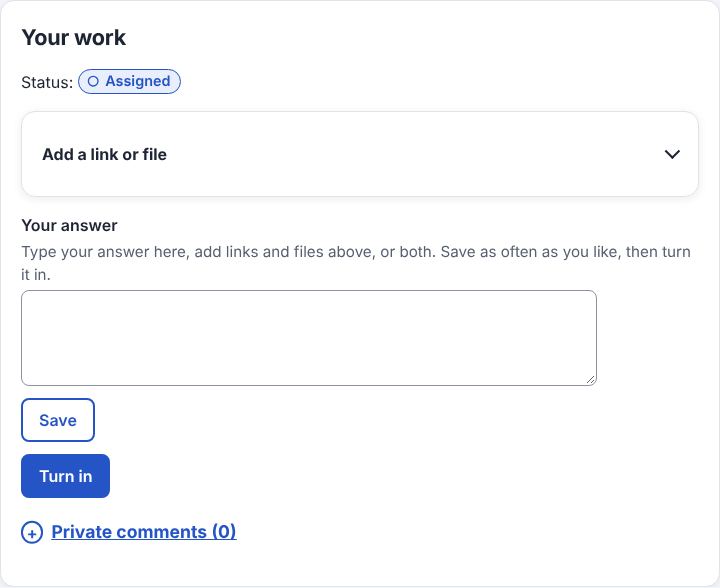
-
To change something after turning it in, choose Unsubmit, make the changes and turn it in again. (Command:
submission.unsubmit.)
Good to know
- Pictures, sound and video you add show in the page; a PDF shows its first page, and See all pages opens every page.
- Work turned in after the due date is marked "Done late".
- Some work closes at its due date: it says "Closes at the due date" on the work and in your To-do. After that time it says "Submissions closed" and can't be turned in, unsubmitted or changed. What you turned in on time stays turned in.
- Need more time for closed work? Ask your teacher in a private comment: they can reopen it for you until a time they choose ("Reopened for you until …").
- On a phone, a slim strip stays at the bottom of an assignment, just above the menu bar: your status, Turn in (or Unsubmit once you've turned it in) and Your work, which takes you to the full section. It hides while you type. Questions and quizzes don't have it: you answer them on the page.
Example: Ali types his answer, takes a photo of his drawing with Take a photo, and chooses Turn in. He notices a mistake, chooses Unsubmit, fixes it and turns it in again before Thursday.
Related: Find your work · Grades and comments · Answer a question